

 Русский
 中文
中文
 Español
 Deutsch
 Português
 日本語
日本語

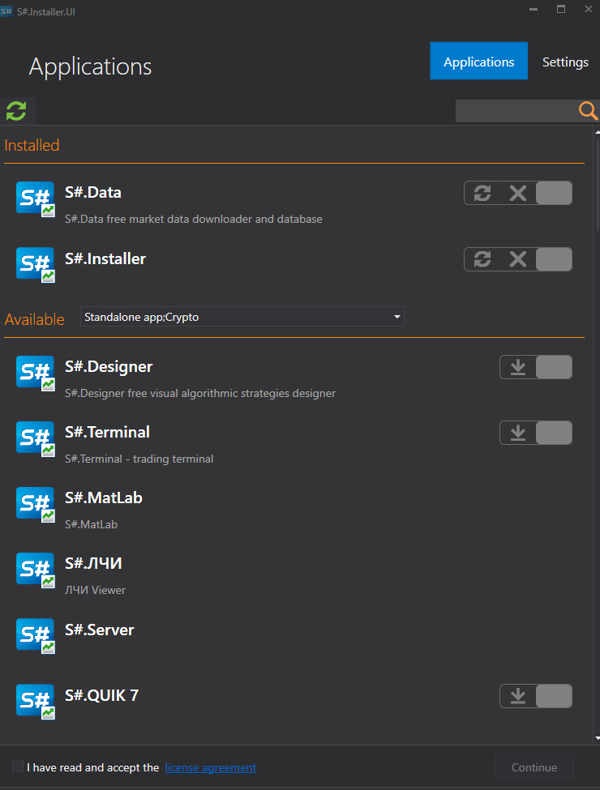
The Installer allows you to:
- download and install Designer, Terminal, Hydra
- buy or install connectors MT 4, MT 5, MatLab
- buy and install additional software
- install the program together with bought connectors
- track the process of purchasing new programs
- download the API library and automatically tracks its updates.
- download the purchased training lessons, the Shell.
How to install the program:
Download 142263 (.NET 6 will be installed automatically).
Start the installation file stocksharp_setup.exe and follow the instructions. Sometimes Windows prevent the installation and pop up the warning like below:
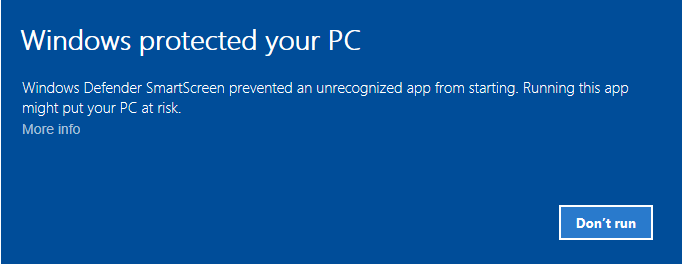 In this case click <u>More info</u> in the warning window. You'll get the next one:
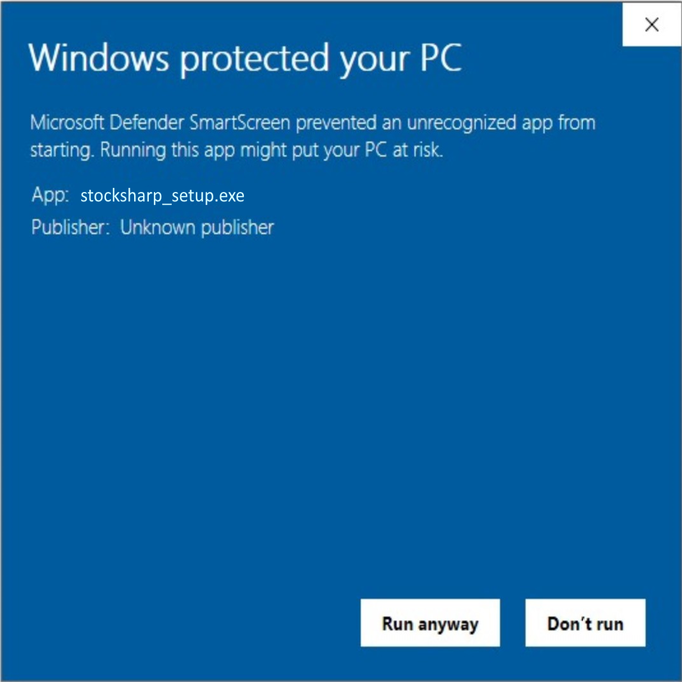 After clicking "Run anyway" button the installation begins.
After installation, open the program window.
How to work with Installer:
Installer allows you to:
- select programs available for download
- manage updates of downloaded programs
- purchase available paid programs
For the convenience of finding the necessary product in the program, you can choose the type of application.
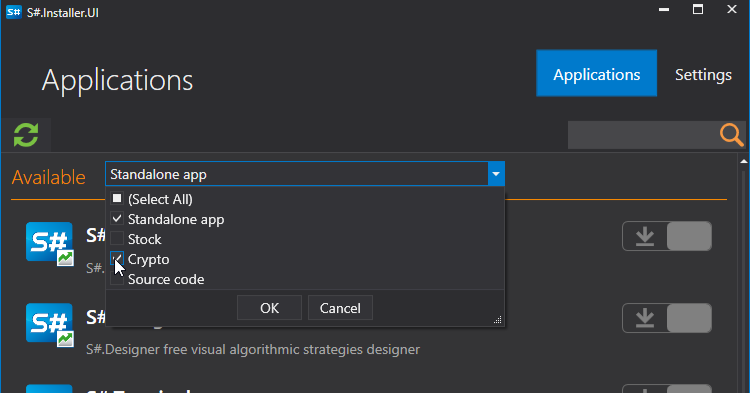
To installthe desired application, you need to:
- Select the app, click install, agree to the license agreement, and click Continue.
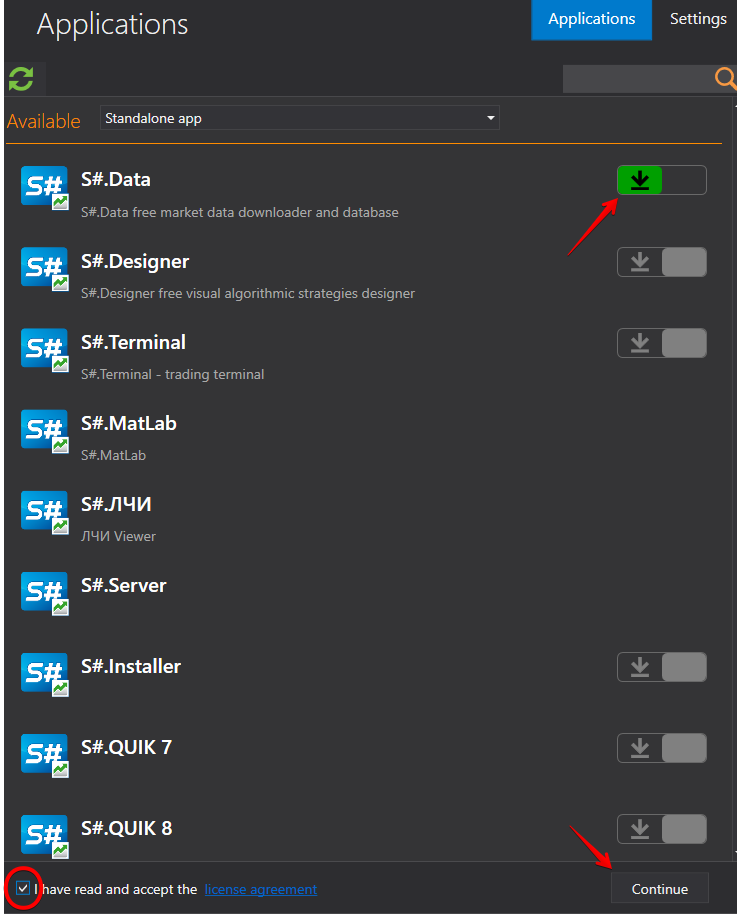
- After this you need to choose the installation path. **IMPORTANT!**It is necessary that the folder where the program will be installed is empty.
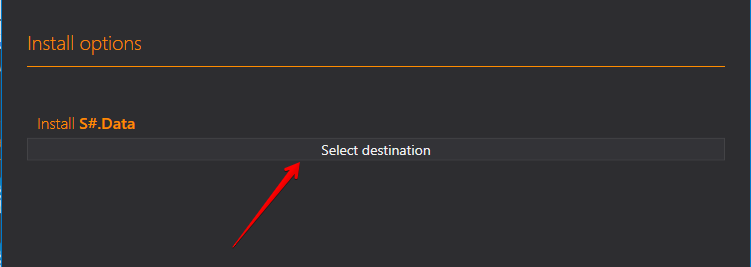
After selecting the directory, click Continue.
Select Execute and the installation process begins.
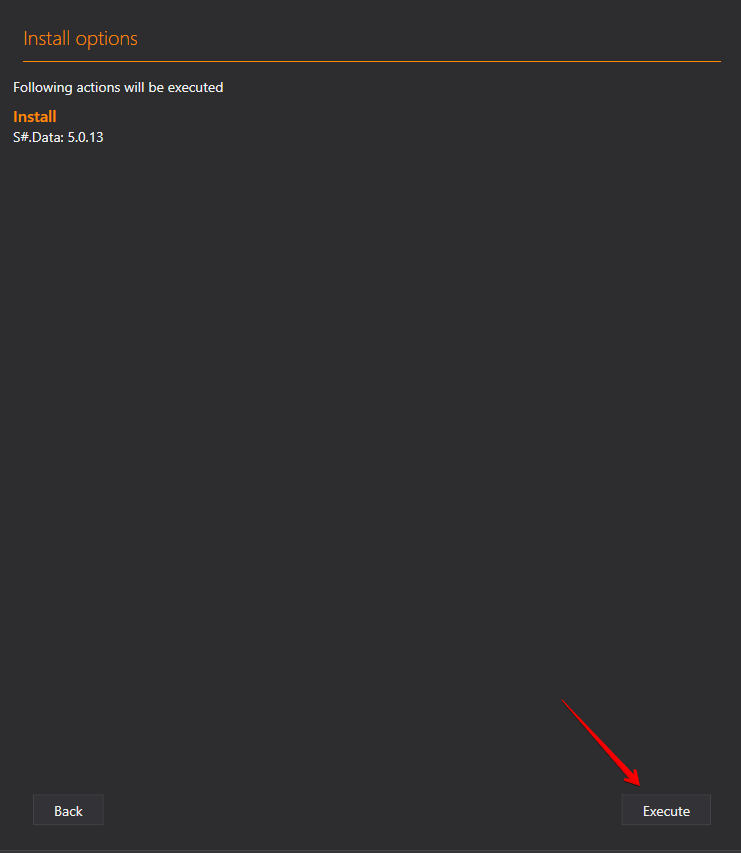
- After installation, you can use the program.
To deletethe program, select delete and click Continue.

To repair, select repair and click Continue.

Installer independently tracks all software updates and updates itself automatically. Therefore, there is no need to delete it after installation. Installer is not closed by clicking on the "X" in the program window, but is closed via the toolbar, select the menu (using the right mouse button) Close.
You can also check for updates by clicking the check for updates button in the right corner of the program window.
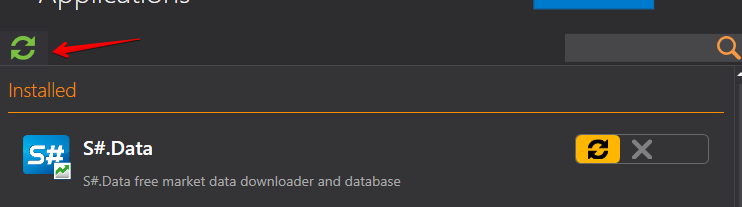
If updates are available, a notification will appear.

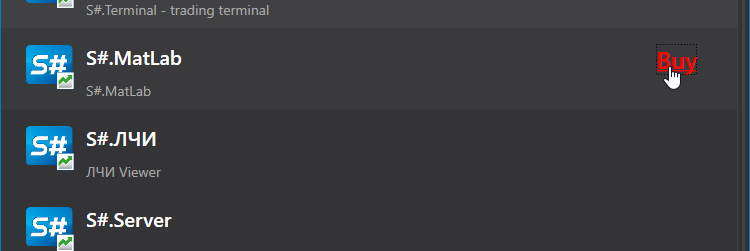
To purchase paid apps, select the software you need and click the Buy button.
Comments (57)
Login or Create account, Log in or register to leave a comment
Hi,
I've tryed using this installer, but it is failing with an error on the NuGet package. See below: 12:17:53.587 | Logger | update check failed: System.IO.FileLoadException: Could not load file or assembly 'NuGet.PackageManagement, Version=5.6.0.5, Culture=neutral, PublicKeyToken=31bf3856ad364e35' or one of its dependencies. Strong name validation failed. (Exception from HRESULT: 0x8013141A) File name: 'NuGet.PackageManagement, Version=5.6.0.5, Culture=neutral, PublicKeyToken=31bf3856ad364e35' ---> System.Security.SecurityException: Strong name validation failed. (Exception from HRESULT: 0x8013141A) The Zone of the assembly that failed was: MyComputer
Any advice on how I can fix this?
Hello
What the OS you have?
This is under Windows 10
Hello
Please try the attach. More explanation here https://stackoverflow.com/questions/21763822/how-to-disable-strong-name-verification-for-all-net-assembly
Thanks. This fixed the problem.
Hi,
I'm on Windows 10 and I've downloaded the installer. And I've unlocked and unzipped it as per the instructions above. The batch file will create several folders under my documents folder however, I'm getting an UnauthorizedAccessException anytime it tries to write a file. I've reviewed the Security settings, including adding full access to Everyone. Then I ran the StockSharp.Installer.Console.bat several times (in boh normal user mode and as an admin) but I'm still getting access denied on every file write. For example:
and
Any advice on how to fix this issue?
Can I get some help with this or should I start looking elsewhere?
Version: 5.0.0.0 in 64-bit mode: True OS version: Microsoft Windows NT 6.2.9200.0
Hello I am trying to create my first connection to an existing interactive brokers account. On your page:
https://doc.stocksharp.com/html/db1de349-84ef-4e59-a30b-c34a9d47bed2.htm
the connection settings window shows a username and password input.
but on my S# Terminal v 5.0.19 Window, I add interactive brokers and there is no place to enter the account's username and password.
Thank you for your help.
Matt
Tristan you need to first check the box on the installer zip file that says "unblock" I was getting a similar message as you but their install instructions were very clear with that important step.
FIXED!
@matt Thanks for trying to help. As stated above, I already clicked on the "Unblock" check box but that wasn't the issue. However, with your encouragement, I decided to try it again. So thanks for the support. I greatly appreciate it.
** SOLUTION ** Turned out that my Antivirus application was protecting the MyDocuments folder. Once I removed the protection everything started working as expected.
is there any guide? how to install it in linux?
i want to
Windows 10 box. Installation failed with following error. Any idea?
23:54:40.388 | ProgressHelper | STATUS: Updates check complete 23:54:40.388 | ProductProvider | nuget: unlocked 23:54:40.389 | ProductProvider | sleep for 1.00:00:00 23:54:40.390 | S#.Installer.Console | System.AggregateException: One or more errors occurred. (can't install this product. independent=True, packageavailable=True, installed=True) ---> System.InvalidOperationException: can't install this product. independent=True, packageavailable=True, installed=True at StockSharp.Installer.Product.InstallAsync(ProductVersion version, String dir, CancellationToken token) at StockSharp.Installer.Console.Program.ExecuteAsync() --- End of inner exception stack trace --- at System.Threading.Tasks.Task.ThrowIfExceptional(Boolean includeTaskCanceledExceptions) at System.Threading.Tasks.Task.Wait(Int32 millisecondsTimeout, CancellationToken cancellationToken) at System.Threading.Tasks.Task.Wait() at StockSharp.Installer.Console.Program.Main(String[] args) 23:54:40.404 | ConfigProvider | saving installations to C:\Users\thinkpad\Documents\StockSharp\Installer\installer_apps_installed.xml 23:54:40.429 | ConfigProvider | saving app cache to C:\Users\thinkpad\Documents\StockSharp\Installer\installer_apps.xml 23:54:40.547 | ProductProvider | product provider main task is canceled
Maybe this is the reason?
Thanks Mikhail.
If this is the cause, how can I bring the installer up? Or how can I clean up and re-install the installer and continue to install the other components.
I experienced exactly the same error. I'm also working on Windows 10
It is already installed, into the subfolder. Just run and use. No reason try to run the bat file more than 1 time.
The sub folder stocksharp.installer.ui (under the extracted installer) is empty.
If this is nor right, where is the destination folder?
Please send to support@stocksharp.com logs from Documents/Stocksharp/Installer/Logs
Email sent. Thanks.
Hi,
Looks like somebody put in a ton of work on this automated installer. Much appreciated!
Significant problem here, though.
First, running latest Windows 10, I don't have an Unblock choice. Doesn't 'seem' to be affecting the install, though
Second, at the end of the bat file, I get the error msg in the attached screenshot.
Lastly, when I OK that msg, the console shows up but with the APPS tab showing no Apps, so I cannot continue.
I'd really love to see how the full install works out... so what do I do next?
Best, Merlin
Thanks but, sadly, NOT FIXED ;)
I did a clean install from a fresh download of your zip file just now.
I then added a PAUSE statement at the end of your BAT file. The result, I was able to capture, at the tail end:
12:43:44.357 | ProgressHelper | STATUS: Updates check complete 12:43:44.357 | ProductProvider | nuget: unlocked 12:43:44.358 | ProductProvider | sleep for 1.00:00:00 12:43:44.359 | S#.Installer.Console | System.AggregateException: One or more errors occurred. (can't install this product. independent=True, packageavailable=True, installed=True) ---> System.InvalidOperationException: can't install this product. independent=True, packageavailable=True, installed=True at StockSharp.Installer.Product.InstallAsync(ProductVersion version, String dir, CancellationToken token) at StockSharp.Installer.Console.Program.ExecuteAsync() --- End of inner exception stack trace --- at System.Threading.Tasks.Task.ThrowIfExceptional(Boolean includeTaskCanceledExceptions) at System.Threading.Tasks.Task.Wait(Int32 millisecondsTimeout, CancellationToken cancellationToken) at System.Threading.Tasks.Task.Wait() at StockSharp.Installer.Console.Program.Main(String[] args) 12:43:44.371 | ConfigProvider | saving app cache to D:\MerlinOne\Documents\StockSharp\Installer\installer_apps.xml 12:43:44.496 | ProductProvider | product provider main task is canceled
D:\StockSharpTemp>pause Press any key to continue . . .
Please get me an Early XMas Present of a clean install. This is much needed if I'm going to be able to use StockSharp.
If you need my further help in debugging this, my system and I are at your disposal.
Thanks, Merlin
It looks like your are using outdated version of installer. Please download updated installer from https://stocksharp.com/file/115526/Installer_zip/ and run .bat file from this archive.
It seems you got same issue as mine. Did u see my steps.
Try to delete the installer extracted folder AND the stockshark data folder in your Document folder (from there you will find your installation installer/logs
Cheers,
Finally I got it installed.
This was what I did:
Many thanks
Thanks Cam Zhao :)
I skipped step 1 and 6. I suspect the Step 5 was the culprit. I cleared all except the credentials.xml (which has my UID and PW to be able to autolog in during the install.bat procedure.
Everything worked as advertised, and the install of all the free components worked like a charm.
MAJOR KUDOS to the StockSharp team for investing the time and resources in order to produce a VERY professional install, particularly for all of those who are not fluent in Russian :) lol
I haven't looked yet, but the next challenge will be the User Manuals and the YouTube channel (which I found completely unusable in the past).
Thanks again Cam and to the StockSharp Team who made this possible.
Best, Merlin
18:23:42.302 | ProfileHelper | login error: System.InvalidOperationException: Error connection ---> System.IO.IOException: Unable to read data from the transport connection: 远程主机强迫关闭了一个现有的连接。. ---> System.Net.Sockets.SocketException (10054): 远程主机强迫关闭了一个现有的连接。 at System.Net.Sockets.NetworkStream.Read(Byte[] buffer, Int32 offset, Int32 size) --- End of inner exception stack trace --- at System.Net.Sockets.NetworkStream.Read(Byte[] buffer, Int32 offset, Int32 size) at Ecng.Serialization.BinaryHelper.ReadBytes(Stream stream, Byte[] buffer, Int32 len, Int32 pos) at Ecng.Serialization.BinaryHelper.ReadByteEx(Stream stream, Byte[] buffer) at StockSharp.Fix.Native.BaseFixReader.ReadByte() at StockSharp.Fix.Native.TextFixReader.ReadTag() at StockSharp.Fix.Native.Extensions.#=zmNphM38=(IFixReader #=zAFMNCKw=, FixTags #=zuTwty2dU1f_X) at StockSharp.Fix.Native.Extensions.ReadHeader(IFixReader reader, Boolean skipBeginString, String expectedVersion) at StockSharp.Fix.Dialects.BaseFixDialect.#=zOZSN7MnkrZYC94p6ghmgzJ2DwwhU_YSxCv$hU7I6RNM5(Action
1 #=zAe1JROC8QqgH) at StockSharp.Fix.FixMessageAdapter.#=zZ$vmI14cpnIp(IFixDialect #=zn1X5CQK8tqBK, Int32 #=zFkCjxv8ae_x4cFmu5ib52Jk=) --- End of inner exception stack trace --- at StockSharp.Algo.TraderHelper.<>c__DisplayClass135_0.<DoConnect>b__1() at Ecng.Common.Converter.<>c__DisplayClass22_0.<DoInCulture>b__0() at Ecng.Common.Converter.DoInCulture(CultureInfo cultureInfo, Func1 func) at Ecng.Common.Converter.DoInCulture(CultureInfo cultureInfo, Action action) at StockSharp.Algo.TraderHelper.DoConnect(IMessageAdapter adapter, IEnumerable1 requests, Boolean waitResponse, Func2 newMessage) at StockSharp.Algo.TraderHelper.Download[TResult](IMessageAdapter adapter, Message request) at StockSharp.Community.FIX.BaseFixClient.Do[TResult](Message message) at StockSharp.Community.FIX.AuthenticationClient.Login() at StockSharp.Community.FIX.AuthenticationClient.StockSharp.Community.IAuthenticationClient.Login() at StockSharp.Installer.ProfileHelper.TryLogin(ServerCredentials cred, Boolean force) at StockSharp.Installer.ProfileHelper.LoginAsync()Hi,
I get the following message and when I press any key the window disappears.
21:53:39.934 | S#.Installer.Console | no arguments 21:53:39.978 | S#.Installer.Console | Usage: StockSharp.Installer.Console.exe [--forcecheck] [--allowcache] [--pre] [--noerror] [--backup_settings] [--cleardir] show [package_id]|show_updates|show_installed|install package_id path [run_exe_name]|update package_id [run_exe_name]|repair package_id [run_exe_name]|remove package_id 21:53:39.982 | S#.Installer.Console | press any key to continue...
Hi,
I now just get the .bat file that appears for a short time. I have tried uninstalling all net frameworks and installing only the .NET core 3.1 also have followed all the steps.
Any ideas or workarounds?
thanks, Tom
Hi, So yesterday I had Stocksharp installed on my PC for the first time and all was working fine. This morning I opened up Stocksharp Installer and found several packages needed updating. I clicked on update/continue and it looked like the packages were installed, however the installer will not start now. I did see you needed dotnet5 so I installed this. I tried removing Stocksharp (deleting installer directory and the one in my documents) and re-installing but to no avail.
Any thoughts? Cheers, Nick
So I tried a complete re-install today (deleted everything and started again) and got the following error message:
07:20:22.387| |ProgressHelper| GET https://nuget.stocksharp.ru/x/Search()?$filter=IsLatestVersion&searchTerm=''&targetFramework=''&includePrerelease=false&$skip=0&$top=100&semVerLevel=2.0.0 07:20:22.618| |ProgressHelper| InternalServerError https://nuget.stocksharp.ru/x/Search()?$filter=IsLatestVersion&searchTerm=''&targetFramework=''&includePrerelease=false&$skip=0&$top=100&semVerLevel=2.0.0 230ms 07:20:22.826| |ProgressHelper| GET https://nuget.stocksharp.ru/x/Search()?$filter=IsLatestVersion&searchTerm=''&targetFramework=''&includePrerelease=false&$skip=0&$top=100&semVerLevel=2.0.0 07:20:23.067| |ProgressHelper| InternalServerError https://nuget.stocksharp.ru/x/Search()?$filter=IsLatestVersion&searchTerm=''&targetFramework=''&includePrerelease=false&$skip=0&$top=100&semVerLevel=2.0.0 239ms 07:20:23.278| |ProgressHelper| GET https://nuget.stocksharp.ru/x/Search()?$filter=IsLatestVersion&searchTerm=''&targetFramework=''&includePrerelease=false&$skip=0&$top=100&semVerLevel=2.0.0
I can visit the page in a browser & ping nuget.stocksharp.ru, but the search is not returning any results.
The XML result from the server is:
<m:error xmlns:m="http://schemas.microsoft.com/ado/2007/08/dataservices/metadata"> <m:code/> <m:message xml:lang="en-US">An error has occurred.</m:message> </m:error>
Any thoughts? Many thanks,
Nick
Hi,
I have tried to use the installer provided but am not having much luck. I have followed the instructions and have VS2019 installed (with .NET 5)
When i run setup_installer.bat it prompts me for my username and password. It successfully logs in and then proceeds to download a heap of files.
Once the bat file finishes running is terminates with the lines below.
15:49:10.320 | ConfigProvider | saving installations to C:\Users\james\Documents\StockSharp\Installer\installer_apps_installed.xml 15:49:10.333 | ConfigProvider | saving installations done 15:49:10.334 | ProductProvider | product provider main task is canceled 15:49:10.335 | S#.Installer.Console | starting S#.Installer (c:\users\james\desktop\installerconsole\stocksharp.installer.ui\StockSharp.Installer.UI.exe)... 15:49:10.335 | InstallerChannel | pipe server task is canceled
No GUI or installer starts.
I have tried to manually double click StockSharp.Installer.UI.exe, but it does not run / show anything.
Can you please advise what may be the issue here? I have also attached the log file (with my email removed from the log
Even I'm also facing the same issue. Team, please help to resolve the problem
Can't install.
13:47:02.954 | ProfileHelper | trying to login (xxx@gmail.com)... 13:47:03.154 | ProfileHelper | login error: System.InvalidOperationException: Error connection ---> System.IO.IOException: Unable to read data from the transport connection: An existing connection was forcibly closed by the remote host.. ---> System.Net.Sockets.SocketException (10054): An existing connection was forcibly closed by the remote host. at System.Net.Sockets.NetworkStream.Read(Byte[] buffer, Int32 offset, Int32 size) --- End of inner exception stack trace --- at StockSharp.Algo.TraderHelper.<>c__DisplayClass137_0
1.<Download>g__OtherMessageHandler|1(Message msg) at StockSharp.Algo.TraderHelper.<>c__DisplayClass137_01.<Download>b__2(Message msg) at StockSharp.Algo.TraderHelper.<>c__DisplayClass135_0.<DoConnect>b__0(Message msg) --- End of inner exception stack trace --- at StockSharp.Algo.TraderHelper.<>c__DisplayClass135_0.<DoConnect>b__1() at Ecng.Common.Converter.<>c__DisplayClass22_0.<DoInCulture>b__0() at Ecng.Common.Converter.DoInCulture(CultureInfo cultureInfo, Func1 func) at Ecng.Common.Converter.DoInCulture(CultureInfo cultureInfo, Action action) at StockSharp.Algo.TraderHelper.DoConnect(IMessageAdapter adapter, IEnumerable1 requests, Boolean waitResponse, Func`2 newMessage) at StockSharp.Algo.TraderHelper.Download[TResult](IMessageAdapter adapter, Message request) at StockSharp.Community.FIX.BaseFixClient.GetResponse[TResult](Message message) at StockSharp.Community.FIX.AuthenticationClient.Login() at StockSharp.Community.FIX.AuthenticationClient.StockSharp.Community.IAuthenticationClient.Login() at StockSharp.Installer.ProfileHelper.TryLogin(ServerCredentials cred, Boolean force) at StockSharp.Installer.ProfileHelper.LoginAsync()инсталлер при ссылке на соглашение внизу дает вот такое https://stocksharp.com/error/notfound/
кнопка "продолжить" блокирована :(
при запуске setup_installer.bar
19:08:02.887 | ProfileHelper | login error: System.InvalidOperationException: Ошибка соединения ---> System.IO.IOException: Unable to read data from the transport connection: Удаленный хост принудительно разорвал существующее подключение.. ---> System.Net.Sockets.SocketException (10054): Удаленный хост принудительно разорвал существующее подключение. at System.Net.Sockets.NetworkStream.Read(Byte[] buffer, Int32 offset, Int32 size) --- End of inner exception stack trace --- at StockSharp.Algo.TraderHelper.<>c__DisplayClass137_0
1.<Download>g__OtherMessageHandler|1(Message msg) at StockSharp.Algo.TraderHelper.<>c__DisplayClass137_01.<Download>b__2(Message msg) at StockSharp.Algo.TraderHelper.<>c__DisplayClass135_0.<DoConnect>b__0(Message msg) --- End of inner exception stack trace --- at StockSharp.Algo.TraderHelper.<>c__DisplayClass135_0.<DoConnect>b__1() at Ecng.Common.Converter.<>c__DisplayClass22_0.<DoInCulture>b__0() at Ecng.Common.Converter.DoInCulture(CultureInfo cultureInfo, Func1 func) at Ecng.Common.Converter.DoInCulture(CultureInfo cultureInfo, Action action) at StockSharp.Algo.TraderHelper.DoConnect(IMessageAdapter adapter, IEnumerable1 requests, Boolean waitResponse, Func`2 newMessage) at StockSharp.Algo.TraderHelper.Download[TResult](IMessageAdapter adapter, Message request) at StockSharp.Community.FIX.BaseFixClient.GetResponse[TResult](Message message) at StockSharp.Community.FIX.AuthenticationClient.Login() at StockSharp.Community.FIX.AuthenticationClient.StockSharp.Community.IAuthenticationClient.Login() at StockSharp.Installer.ProfileHelper.TryLogin(ServerCredentials cred, Boolean force) at StockSharp.Installer.ProfileHelper.LoginAsync()Hey are there any steps to install on linux?. According to the docs the product is compatible with Net 5.0. VS Code or Ryder whatever works.
Hello, I installed .NET 5 (I also have .NET 6 installed), unblocked the folder, was able to run the bat file and sign in my email address and password. Once the program was running I kept getting these four lines repeating endlessly. I'm on Windows 10
20:59:05.750 | ProgressHelper | GET https://nuget.stocksharp.com/x/v3/registration/stocksharp.okcoin/index.json 20:59:05.787 | ProgressHelper | GET https://api.nuget.org/v3/registration5-gz-semver2/stocksharp.okcoin/index.json 20:59:05.813 | ProgressHelper | NotFound https://nuget.stocksharp.com/x/v3/registration/stocksharp.oanda/index.json 146ms 20:59:05.813 | ProgressHelper | OK https://api.nuget.org/v3/registration5-gz-semver2/stocksharp.oanda/index.json 156ms
The batch file just flashes the terminal and disappears. Windows 7 had installed .net 5 . Still couldn't initiate the installation process or even ask login details. How to fix that?
Unable to verify username and password. The reason is because it is not connecting to your server.
Hi each time i run Sdesigner i get this error
S#.Designer
System.Windows.Markup.XamlParseException: The invocation of the constructor on type 'StockSharp.Designer.MainWindow' that matches the specified binding constraints threw an exception. ---> System.TypeLoadException: Method 'AddLink' in type '#=zcBGjmmYQ71GT9HlC5NZdJx8=' from assembly 'StockSharp.Xaml.Diagram, Version=5.0.0.0, Culture=neutral, PublicKeyToken=null' does not have an implementation. at StockSharp.Xaml.Diagram.DiagramExtensions.CreateRegistry() at StockSharp.Designer.DesignerStrategiesRegistry..ctor(StrategiesRegistrySettings settings) at StockSharp.Designer.MainWindow.InitializeStrategiesRegistry() at StockSharp.Designer.MainWindow..ctor() --- End of inner exception stack trace --- at System.Windows.Markup.XamlReader.RewrapException(Exception e, IXamlLineInfo lineInfo, Uri baseUri) at System.Windows.Markup.WpfXamlLoader.Load(XamlReader xamlReader, IXamlObjectWriterFactory writerFactory, Boolean skipJournaledProperties, Object rootObject, XamlObjectWriterSettings settings, Uri baseUri) at System.Windows.Markup.WpfXamlLoader.LoadBaml(XamlReader xamlReader, Boolean skipJournaledProperties, Object rootObject, XamlAccessLevel accessLevel, Uri baseUri) at System.Windows.Markup.XamlReader.LoadBaml(Stream stream, ParserContext parserContext, Object parent, Boolean closeStream) at System.Windows.Application.LoadBamlStreamWithSyncInfo(Stream stream, ParserContext pc) at System.Windows.Application.LoadComponent(Uri resourceLocator, Boolean bSkipJournaledProperties) at System.Windows.Application.DoStartup() at System.Windows.Application.<.ctor>b__1_0(Object unused) at System.Windows.Threading.ExceptionWrapper.InternalRealCall(Delegate callback, Object args, Int32 numArgs) at System.Windows.Threading.ExceptionWrapper.TryCatchWhen(Object source, Delegate callback, Object args, Int32 numArgs, Delegate catchHandler)
OK
can you help me please thanks
can't install the installer, gives NullReferenceException
I have installed the Installer, but when it runs I get the attached error, what is the reason?
Hello,
Please i couldnt install your trading platform the net 5 is no more supported now it s net6 but i did installed both of them but couldn t run the setup_installer.bat.
Thank you
Microsoft defender keeps deleting the file, I cant install. Is there any other solution then switching Microsoft Defender off?
I had clik "StockSharp.Installer.UI.exe" ,but nothing changing win 10 had net 6 sdk
I had clik "StockSharp.Installer.UI.exe" ,but nothing changing win 10 had net 6 sdk
Hello, what do you mean under "nothing"? Can you attach screenshot and logs? Logs are placed in C:\Users*YOUR USERNAME*\Documents\StockSharp\Installer\Logs
Not sure what are the errors? Can anyone help? Thanks.
04:36:22.565|Debug |ProgressHelper| GET https://nuget.stocksharp.com/x/v3/registration/sqlitepclraw.provider.e_sqlite3.netstandard11/index.json 04:36:22.821|Debug |ProgressHelper| NotFound https://nuget.stocksharp.com/x/v3/registration/sqlitepclraw.provider.e_sqlite3.netstandard11/index.json 255ms 04:36:22.824|Debug |ProgressHelper| GET https://api.nuget.org/v3/registration5-gz-semver2/sqlitepclraw.provider.e_sqlite3.netstandard11/index.json 04:36:23.194|Debug |ProgressHelper| OK https://api.nuget.org/v3/registration5-gz-semver2/system.valuetuple/index.json 946ms 04:36:23.260|Debug |ProgressHelper| GET https://nuget.stocksharp.com/x/v3/registration/sqlitepclraw.lib.e_sqlite3.v110_xp/index.json 04:36:23.499|Debug |ProgressHelper| NotFound https://nuget.stocksharp.com/x/v3/registration/sqlitepclraw.lib.e_sqlite3.v110_xp/index.json 239ms 04:36:23.502|Debug |ProgressHelper| GET https://api.nuget.org/v3/registration5-gz-semver2/sqlitepclraw.lib.e_sqlite3.v110_xp/index.json 04:36:23.785|Debug |ProgressHelper| OK https://api.nuget.org/v3/registration5-gz-semver2/sqlitepclraw.provider.e_sqlite3.netstandard11/index.json 959ms 04:36:23.887|Debug |ProgressHelper| GET https://nuget.stocksharp.com/x/v3/registration/sqlitepclraw.lib.e_sqlite3.osx/index.json 04:36:24.341|Debug |ProgressHelper| NotFound https://nuget.stocksharp.com/x/v3/registration/sqlitepclraw.lib.e_sqlite3.osx/index.json 453ms 04:36:24.344|Debug |ProgressHelper| GET https://api.nuget.org/v3/registration5-gz-semver2/sqlitepclraw.lib.e_sqlite3.osx/index.json 04:36:24.441|Debug |ProgressHelper| OK https://api.nuget.org/v3/registration5-gz-semver2/sqlitepclraw.lib.e_sqlite3.v110_xp/index.json 937ms 04:36:24.490|Debug |ProgressHelper| GET https://nuget.stocksharp.com/x/v3/registration/sqlitepclraw.lib.e_sqlite3.linux/index.json
Can anyone help? Thanks.
04:36:22.565|Debug |ProgressHelper| GET https://nuget.stocksharp.com/x/v3/registration/sqlitepclraw.provider.e_sqlite3.netstandard11/index.json 04:36:22.821|Debug |ProgressHelper| NotFound https://nuget.stocksharp.com/x/v3/registration/sqlitepclraw.provider.e_sqlite3.netstandard11/index.json 255ms 04:36:22.824|Debug |ProgressHelper| GET https://api.nuget.org/v3/registration5-gz-semver2/sqlitepclraw.provider.e_sqlite3.netstandard11/index.json 04:36:23.194|Debug |ProgressHelper| OK https://api.nuget.org/v3/registration5-gz-semver2/system.valuetuple/index.json 946ms 04:36:23.260|Debug |ProgressHelper| GET https://nuget.stocksharp.com/x/v3/registration/sqlitepclraw.lib.e_sqlite3.v110_xp/index.json 04:36:23.499|Debug |ProgressHelper| NotFound https://nuget.stocksharp.com/x/v3/registration/sqlitepclraw.lib.e_sqlite3.v110_xp/index.json 239ms 04:36:23.502|Debug |ProgressHelper| GET https://api.nuget.org/v3/registration5-gz-semver2/sqlitepclraw.lib.e_sqlite3.v110_xp/index.json 04:36:23.785|Debug |ProgressHelper| OK https://api.nuget.org/v3/registration5-gz-semver2/sqlitepclraw.provider.e_sqlite3.netstandard11/index.json 959ms 04:36:23.887|Debug |ProgressHelper| GET https://nuget.stocksharp.com/x/v3/registration/sqlitepclraw.lib.e_sqlite3.osx/index.json 04:36:24.341|Debug |ProgressHelper| NotFound https://nuget.stocksharp.com/x/v3/registration/sqlitepclraw.lib.e_sqlite3.osx/index.json 453ms 04:36:24.344|Debug |ProgressHelper| GET https://api.nuget.org/v3/registration5-gz-semver2/sqlitepclraw.lib.e_sqlite3.osx/index.json 04:36:24.441|Debug |ProgressHelper| OK https://api.nuget.org/v3/registration5-gz-semver2/sqlitepclraw.lib.e_sqlite3.v110_xp/index.json 937ms 04:36:24.490|Debug |ProgressHelper| GET https://nuget.stocksharp.com/x/v3/registration/sqlitepclraw.lib.e_sqlite3.linux/index.json
Can anyone help? I am getting error msg like this.
04:36:20.951|Debug |ProgressHelper| GET https://api.nuget.org/v3/registration5-gz-semver2/microsoft.packaging.tools/index.json 04:36:21.035|Debug |ProgressHelper| GET https://nuget.stocksharp.com/x/v3/registration/sqlitepclraw.core/index.json 04:36:21.267|Debug |ProgressHelper| NotFound https://nuget.stocksharp.com/x/v3/registration/sqlitepclraw.core/index.json 231ms 04:36:21.273|Debug |ProgressHelper| GET https://api.nuget.org/v3/registration5-gz-semver2/sqlitepclraw.core/index.json 04:36:22.185|Debug |ProgressHelper| OK https://api.nuget.org/v3/registration5-gz-semver2/microsoft.packaging.tools/index.json 1229ms 04:36:22.217|Debug |ProgressHelper| OK https://api.nuget.org/v3/registration5-gz-semver2/sqlitepclraw.core/index.json 943ms 04:36:22.246|Debug |ProgressHelper| GET https://api.nuget.org/v3/registration5-gz-semver2/system.valuetuple/index.json 04:36:22.247|Debug |ProgressHelper| GET https://nuget.stocksharp.com/x/v3/registration/system.valuetuple/index.json 04:36:22.494|Debug |ProgressHelper| NotFound https://nuget.stocksharp.com/x/v3/registration/system.valuetuple/index.json 245ms 04:36:22.565|Debug |ProgressHelper| GET https://nuget.stocksharp.com/x/v3/registration/sqlitepclraw.provider.e_sqlite3.netstandard11/index.json 04:36:22.821|Debug |ProgressHelper| NotFound https://nuget.stocksharp.com/x/v3/registration/sqlitepclraw.provider.e_sqlite3.netstandard11/index.json 255ms 04:36:22.824|Debug |ProgressHelper| GET https://api.nuget.org/v3/registration5-gz-semver2/sqlitepclraw.provider.e_sqlite3.netstandard11/index.json 04:36:23.194|Debug |ProgressHelper| OK https://api.nuget.org/v3/registration5-gz-semver2/system.valuetuple/index.json 946ms 04:36:23.260|Debug |ProgressHelper| GET https://nuget.stocksharp.com/x/v3/registration/sqlitepclraw.lib.e_sqlite3.v110_xp/index.json 04:36:23.499|Debug |ProgressHelper| NotFound https://nuget.stocksharp.com/x/v3/registration/sqlitepclraw.lib.e_sqlite3.v110_xp/index.json 239ms 04:36:23.502|Debug |ProgressHelper| GET https://api.nuget.org/v3/registration5-gz-semver2/sqlitepclraw.lib.e_sqlite3.v110_xp/index.json 04:36:23.785|Debug |ProgressHelper| OK https://api.nuget.org/v3/registration5-gz-semver2/sqlitepclraw.provider.e_sqlite3.netstandard11/index.json 959ms 04:36:23.887|Debug |ProgressHelper| GET https://nuget.stocksharp.com/x/v3/registration/sqlitepclraw.lib.e_sqlite3.osx/index.json 04:36:24.341|Debug |ProgressHelper| NotFound https://nuget.stocksharp.com/x/v3/registration/sqlitepclraw.lib.e_sqlite3.osx/index.json 453ms 04:36:24.344|Debug |ProgressHelper| GET https://api.nuget.org/v3/registration5-gz-semver2/sqlitepclraw.lib.e_sqlite3.osx/index.json 04:36:24.441|Debug |ProgressHelper| OK https://api.nuget.org/v3/registration5-gz-semver2/sqlitepclraw.lib.e_sqlite3.v110_xp/index.json 937ms 04:36:24.490|Debug |ProgressHelper| GET https://nuget.stocksharp.com/x/v3/registration/sqlitepclraw.lib.e_sqlite3.linux/index.json
Hi I like to know what kind of error msg I received?
Please, update the .NET Framework. You should use net 6 x64.
I uninstalled my. NET 4 x86 and installed. NET 6. with my Windows 8 64 bit. Should I change to a Windows 10 64 bit instead?
Hello< I am trying to download hydra from stocksharp but I use a mac OS and I currently cannot find any helpful resources
Only Hydra server compatible for cross-platform. Standalone UI Hydra can work on Windows only.
hey sorry i have a question does this work with mac?